


Viking Gate Opener Troubleshooting: VFlex Error Messages, LEDs, and Fixes
Every current Viking operator carries the VFlex control board with an LCD diagnostics display, so the board usually tells you exactly what is wrong. Below, we decode every error message from the official Viking manuals, explain the status LEDs, and walk through the safe checks you can do before calling a technician.
Call (650) 560-4646
Diagnose your Viking gate in two taps
Pick your gate type, then the symptom. As a result, you get the likely causes, one safe check, and what the display should be telling you.
Step 1 · What kind of gate is it?
Step 2 · What is it doing?
Educational guidance based on the official Viking manuals. Keep people clear of the gate while testing, and never bypass the monitored safety inputs.
Start with the display: the board tells you what is wrong
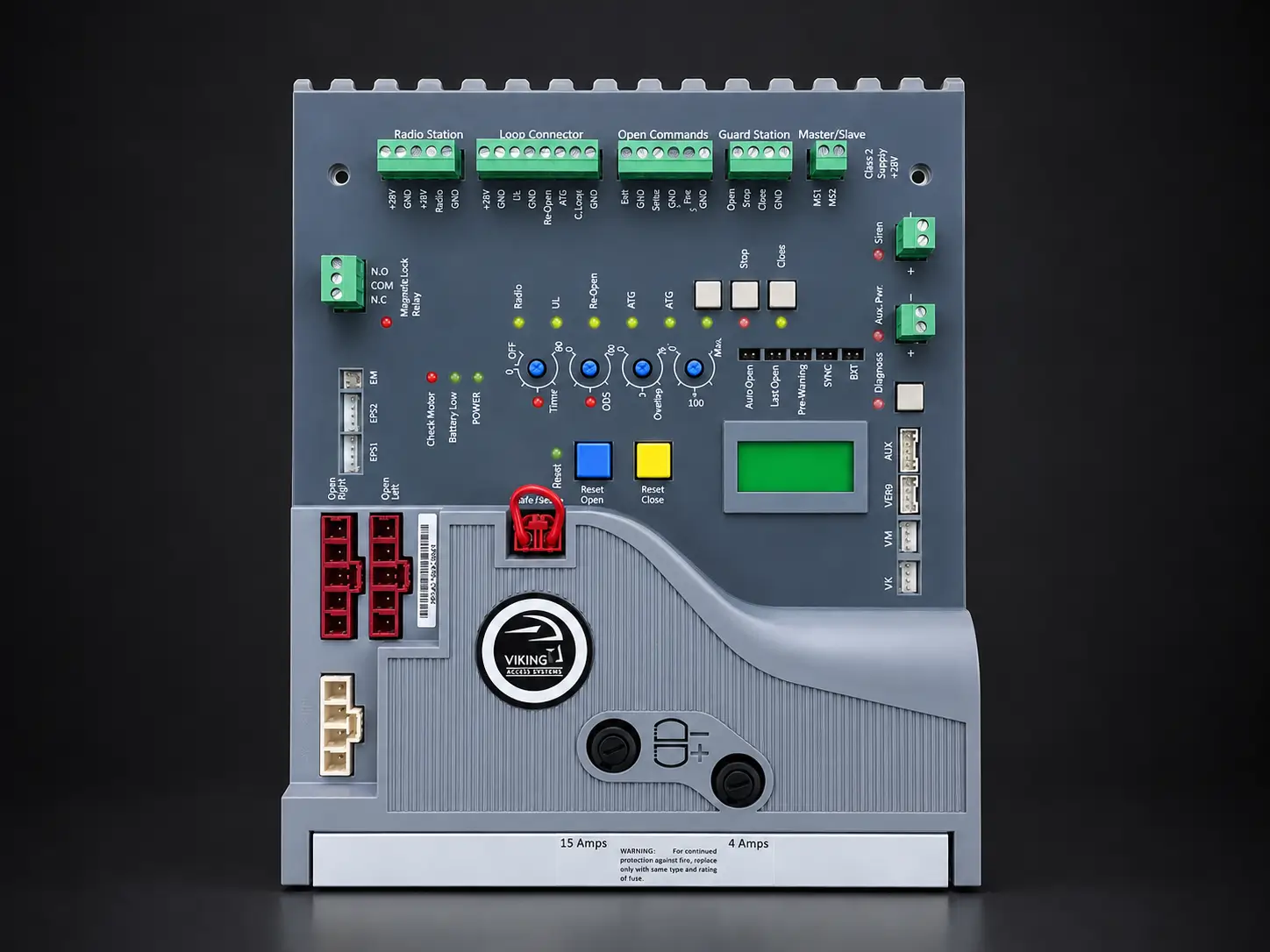
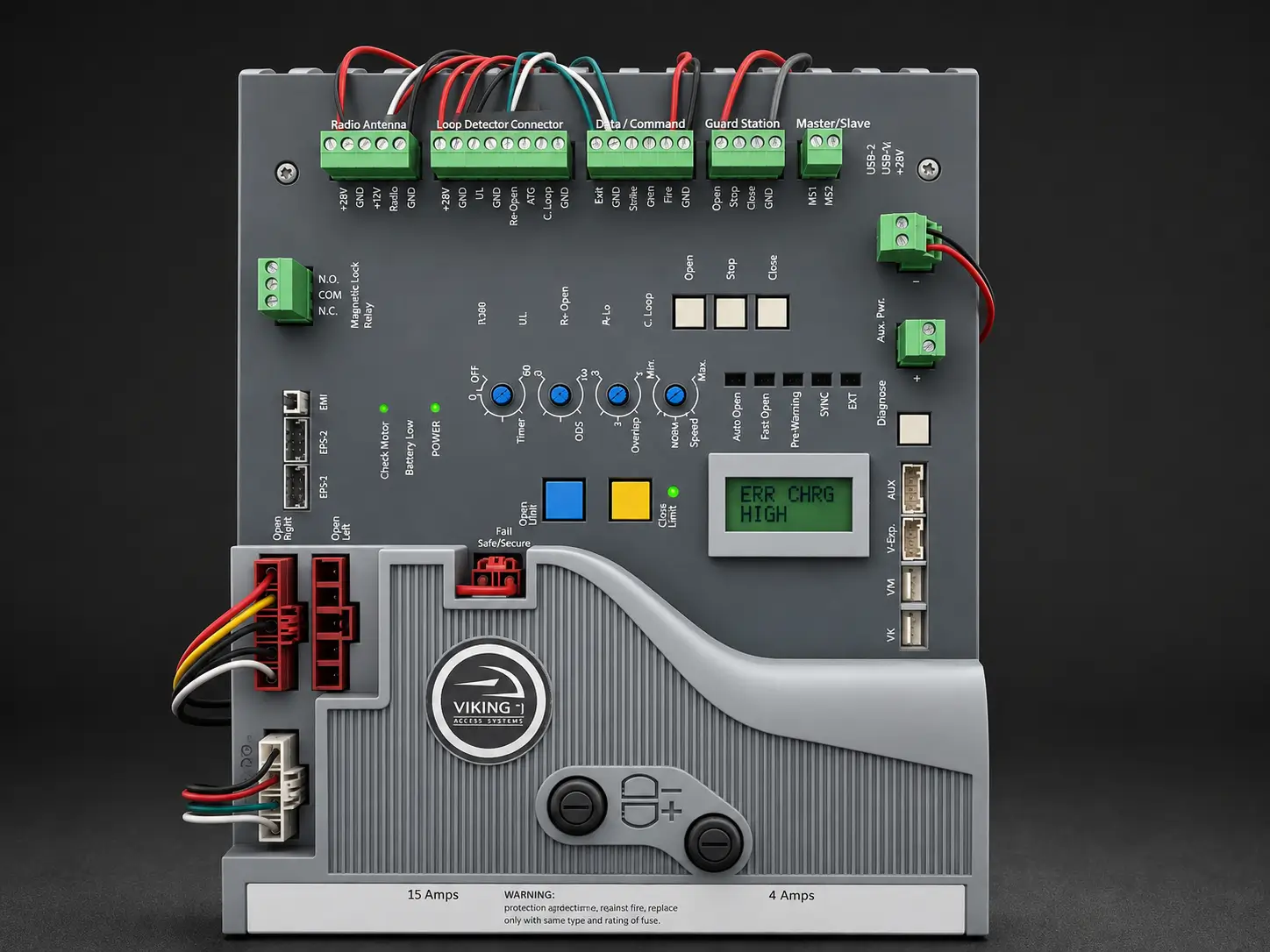
To troubleshoot a Viking gate opener, first read the LCD display on the VFlex control board. Error messages always show first, and the Diagnose LED flashes once for each stored error. Then press the Diagnose button to scroll through every message, note them down exactly, and match them against the tables below.
Because Viking operators are 24VDC electromechanical machines with battery backup, most no-power and weak-gate complaints trace back to a handful of causes: lost AC power, drained or aging batteries, a blown fuse, a limit switch fault, or a safety sensor problem. In short, the display and the LEDs narrow it down before you ever pick up a meter.
Common symptoms at a glance
Match your symptom first, then dig into the error tables below.
Nothing happens at all
First check the AC POWER switch and breaker. Then read the POWER LED: flashing means the unit lost AC and is running on batteries, while off means no power reached the board. Also check both 4A fuses.
Gate stops or reverses on its own
Look for STOP BY OBSTRUCT or STOP BY OVERLOAD on the display. Usually the gate is binding, so test how freely it moves by hand in manual release before touching the ODS force pot.
Stop LED flashing, gate locked out
A flashing Stop LED plus an ERR SENS message means a monitored photocell or edge failed. By design, the operator stays inoperable until the sensor is fixed and re-learned.
Siren sounding for minutes
Two consecutive obstructions disable the operator and sound the UL alarm for 5 minutes. Meanwhile, check the gate path and hardware for whatever triggered it twice.
Slow gate, dies after outages
Batteries are the usual suspect. Specifically, check BAT VOLT on the display, and remember Viking batteries carry a maximum 2 year warranty, so aging sets should be replaced in pairs.
Board clicks but gate will not move
A solid Check Motor LED means the board sends power but the circuit is open. So check the motor fuse, and make sure the operator is not still in manual release.
Every VFlex error message, decoded
Verbatim from the Viking manuals. Also note: there is no separate photocell code, because sensor faults report as ERR SENS.
Power, charging, and battery errors
ERR AC NO AC No 24VAC supply detected
ERR AC LOW / ERR AC HIGH 24VAC supply out of range
ERR BAT LOW Battery voltage low
ERR CHRG HIGH / ERR CHRG CHECK 4A Charging circuit problems
Fuse and motor errors
ERR FUSE 15 AMP / ERR FUSE 20 AMP Motor fuse blown
RED CONN UNPLUGED Motor connector unplugged
Limit errors: swing vs slide
ERRLIMIT OPN+CLS Limit switch or wiring fault (swing models)
ERR OPN LIMIT / ERR CLS LIMIT / ERR NO LIMIT Limits cleared (slide models)
ERR SPS ... / ERR EPS2 ... Position sensor faults (slide models)
Safety sensor and board errors
ERR SENS UL / ERR SENS RO / ERR SENS UL RO Monitored entrapment sensor fault
ERR EMI ... Power supply panel and EMI board faults
ERR REFV WRONG Internal reference voltage fault
Reading the status LEDs
Besides the display, the board's LEDs give instant answers.
| LED | Solid | Flashing |
|---|---|---|
| POWER | Normal, AC present | Running on batteries only, AC power lost |
| Battery Low | Batteries low | Batteries critically low |
| Diagnose | Errors stored, flash count = number of errors | |
| Stop | Stop command active | Monitored safety sensor fault, gate locked out |
| ODS | Obstruction detected, sudden resistance | Overload detected, sustained resistance |
| Siren | Second consecutive obstruction, alarm condition | |
| Check Motor | Board powering motor but circuit open, check motor fuse and manual release | |
| Limit LEDs | Gate at that limit | Limit not set or limit switch problem |
Likewise, the display doubles as a live multimeter: scroll with the Diagnose button to read MOT AMP, AC VOLT, CHARGE, and BAT VOLT in real time. For example, charge voltage should sit between 26.0 and 28.0 VDC with the Battery Switch off, and motor current should read 0.0 A at idle.
Safe resets and procedures
Straight from the manuals, in the right order.
Power cycle the right way
First, switch off the AC POWER switch on the operator. Then switch the Battery Switch off as well, because the operator otherwise keeps running on its 24VDC batteries.
Wait a moment, then restore the Battery Switch followed by AC power. Afterward, read the display: if an error returns, the underlying fault is still there.
On swing models, the manual also documents a soft reset: momentarily actuate both limit switches at the same time.
Re-learn the safety sensors (UL Learn)
Scroll the display with the Diagnose button until you reach the UL LEARN screen.
Press and hold the Stop button, then press and release Diagnose once. As a result, the display updates to show how many sensors are monitored on each input, for example UL2 RO1.
Re-run this process whenever photocells or edges are added, moved, or replaced, so the board monitors exactly what is installed.
Reset limits on a slide operator
Hold the corresponding Limit Button until its LED flashes, which clears the stored position.
Next, move the gate to the desired position with the on-board Open, Stop, and Close buttons, then hold the Limit Button until the LED goes solid.
Finally, allow the operator its 3 learn cycles: it deliberately runs at half speed while it relearns travel.
Never bypass a safety input. The monitored UL and Re-Open terminals are the UL 325 entrapment protection, and Viking designs the operator to lock out when they fail, precisely because a gate without working sensors can injure someone. Jumping them out does not fix the gate; instead, it removes the one system protecting people in its path.
Batteries, fuses, and power: the usual suspects
Viking operators are 24VDC machines: two 12V batteries power the motor, while the AC line only charges them through a transformer and the Power Supply Panel. Consequently, the gate keeps working through an outage, for roughly 400 cycles on a healthy, fully charged set under the conditions Viking specifies. The flip side is that a silent AC failure can drain the batteries over days, and then the gate dies "out of nowhere".
Therefore, when a Viking gate acts weak or dead, check in this order: AC POWER switch and breaker, the POWER LED (flashing means battery-only), the 4A fuses, the motor fuse (15A swing, 20A slide), and the battery voltage on the display. Viking specifies Yuasa NP7-12 or Viking DUBA12 batteries, and the batteries carry a maximum 2 year warranty, so sets older than that are always replacement candidates. On solar sites, the batteries must be 35Ah or larger, together with at least 80W of 24V panel capacity.
Also worth knowing: the Motor Switch doubles as a self-tripping breaker that protects the motor circuit, and jumper options control what happens on power failure, such as opening the gate automatically or opening once when the battery runs critically low. During any troubleshooting, the Battery Switch disconnects the batteries from the charging circuit.
Have an older Viking board with no screen?

Viking operators installed before the VFlex era carry a different control board with no LCD display at all. Instead, you can recognize these earlier-generation boards by a column of status LEDs labeled directly on the board, such as Charger, Low Battery, Check Mot, Center Loop, Reopen Loop, UL Sens, and Radio Rec, together with physical dials for the Hold Open Timer, Overlap, Fine Tune, and Obstruction Sensor, plus Open, Stop, and Close buttons.
Because there is no diagnostics display, none of the ERR messages above apply to these boards. However, the printed LED labels describe what each light monitors, and the fundamentals are the same 24VDC battery-powered architecture, so lost AC power, drained batteries, blown fuses, and safety sensor faults remain the usual suspects. Meanwhile, the official manuals for these units live in the Discontinued section of Viking's downloads page rather than the current ones.
In practice, these boards are old enough that a persistent fault is often a sign the operator is nearing the end of its service life. We service both generations, so if your Viking has one of these boards, call us at (650) 560-4646: we can repair what is repairable, and if the board is failing, we can quote a modern VFlex-based replacement from the current Viking lineup.
When to stop and call a professional
Some of these faults are owner-fixable: a tripped breaker, a reseated motor connector, or a photocell knocked out of alignment. However, board-level errors like ERR REFV WRONG and persistent ERR CHRG HIGH, lightning protection replacement, limit switch replacement, entrapment sensor wiring, and anything involving the high-voltage side belong with a licensed technician. Notably, Viking's factory warranty runs through its dealer channel and excludes products repaired or altered without written consent, so DIY board surgery can cost you the warranty as well.
We install and service Viking operators daily across the Bay Area. So if the display is showing an error you would rather not chase, or the gate is locked out and you need it moving today, call us at (650) 560-4646: we diagnose the board, fix the actual cause, and leave the safety system compliant. Meanwhile, you can read more about the lineup on our Viking gate opener page.
Related guides and services
Altogether, everything a misbehaving gate needs.
 Brand
BrandViking Gate Openers
Installation and repair of the Viking lineup, such as the F-1, T-21, G-5, and H-10.
View the brand page → Service
Gate Repair
Fast diagnosis and repair across the Bay Area, whatever the brand on the board.
Book a repair → Guide
GuideFAAC Troubleshooting
Likewise for FAAC boards: E024S LED patterns and E124 error codes, decoded.
Read the FAAC guide → Guide
GuideLiftMaster Troubleshooting
Also see our LiftMaster guide for beep codes, dual blinks, and MyQ issues.
Read the LiftMaster guide →Viking gate opener troubleshooting FAQ
What do the error messages on a Viking gate opener display mean?
Why does my Viking gate opener show ERR SENS UL or ERR SENS RO?
Why did my Viking gate stop and start sounding an alarm?
My Viking gate opener has no power. What should I check first?
How do I reset a Viking gate opener?
Does a Viking gate opener work during a power outage?
Do you repair Viking gate openers in the Bay Area?
Viking gate showing an error right now?
Send us the exact message on the display and we arrive knowing what to bring. Additionally, we service every major operator brand, so one visit covers the board, the batteries, the sensors, and the gate hardware itself. Free estimate and a written quote before any work begins.
No spam. No obligation. Just a straightforward quote.